Edit group
As a group administrator, you can make adjustments at any time.
For example, the group administrator can change the group picture or the group name.
They can also correct errors and change the group status (private/public) at any time.

As a group administrator, you can make adjustments at any time.
For example, the group administrator can change the group picture or the group name.
They can also correct errors and change the group status (private/public) at any time.
Anyone who creates a group is automatically the group administrator.
In this role you can
Very important: The group admin is responsible for compliance with the terms of use.
If a post is reported by a member, the group admin must decide how to deal with the post (delete/keep).
The group administrator can activate/deactivate the following here
It’s very simple: Click on the round purple symbol at the bottom right of your group overview.
The group creation takes place in 2 steps:
* Mandatory fields Click on Create group – Done All entries can be changed later at any time -> Edit group
Visible to all ENKORO app users.
Depending on the settings, you can join this group immediately or after approval by the group administrator.
Public groups are perfect for deceased members of the public, for example.
They can of course also be used for any mourning group that anyone can join (with the administrator’s approval if necessary).
The group administrator can change the group status.
This group is a closed society.
Only invited persons can join this group.
Strangers cannot see this group in the app.
Private groups are the best solution for mourners who want to keep to themselves and retain control over the group members.
A few years ago, the inventor of this app was deeply saddened by the news of the death of a loved one.
Without further ado, he converted a website into a condolence website.
Many friends, acquaintances and relatives used this simple platform to share memories and upload photos.
The website was an important source of support for many people.
ENKORO builds on this experience. We will ensure that the memory of loved and valued people is preserved for many grieving people.
ENKORO is based on the planned language Esperanto.
It means: En= In and Koro= Heart and is intended to correspond to the idea of keeping a deceased person alive in the heart
It’s easy to do via Stripe – with a credit card or Apple Pay.
After payment, you will receive the invoice by email.
In the payment process, you decide whether the group should know that you have contributed to the receipt or whether the group should only know that an anonymous participant has contributed.
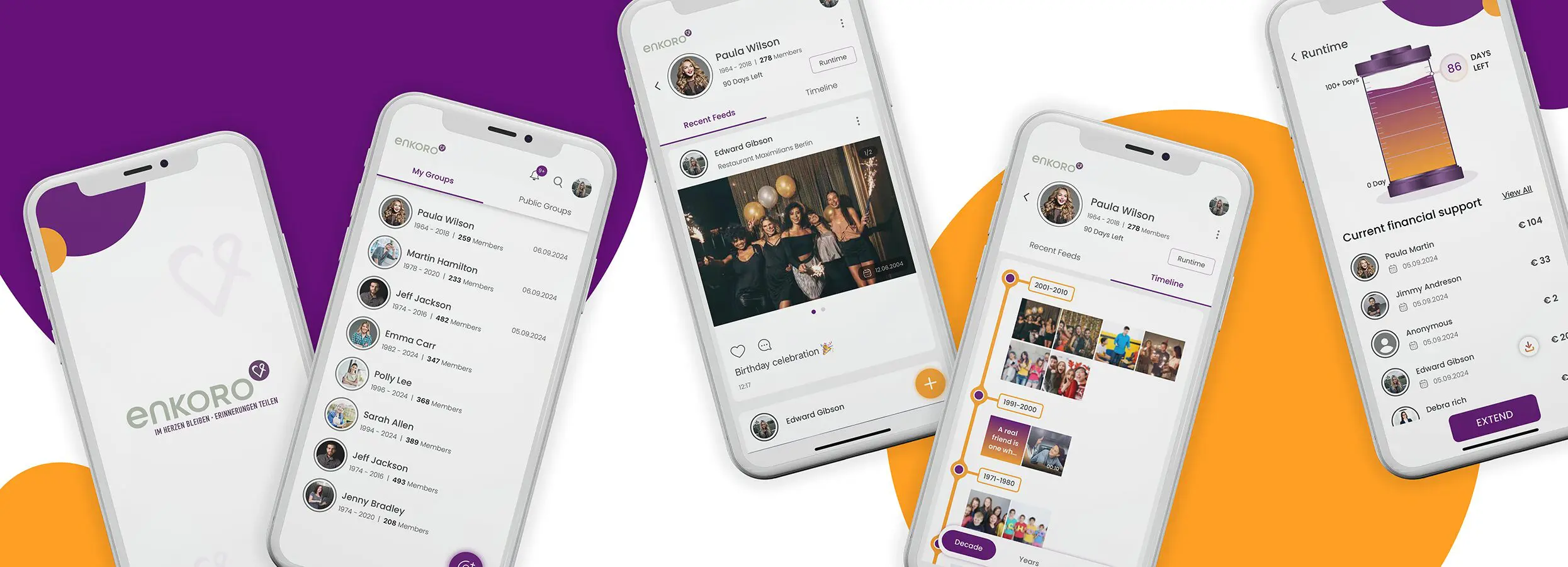
Each group has a graphical display (‘Runtime’ button) that works in a similar way to the fill level of a grain silo.
The grain silo is naturally full at the start of the group, as the group functions completely free of charge for a certain period of time after the group is created.
The fill level of the silo decreases slightly with each calendar day.
As long as the silo is not empty, the group works without restrictions.
Each contribution payment automatically refills the ‘silo’ for all group members.
ENKORO does not charge per user, but per group.
This means that all group members benefit from the payment of one group member.
After that, there is a charge of €1 per day.
It does not matter which group member contributes financially. In the payment process, you can decide whether the other group members can see who has made the payment or whether you want to do this anonymously.
Click on Duration in your group and you will receive an overview of the remaining term of the group and who has contributed to the maintenance of the group so far.
Click on Extend if you want to participate in maintaining the group.
If the ‘Silo’ indicator goes to 0 days, the group content is locked and can no longer be expanded, viewed, commented on or liked.
However, the group can be awakened from its ‘dormancy’ at any time within one year of the end of the term by a payment from a group member.
All group members will then be informed by email that the group has been awakened.
In order to provide you with the best possible experience, we use technologies such as cookies to store and/or access device information. By consenting to these technologies, you agree that we may process data such as browsing behaviour or unique IDs on this site. If you do not consent or withdraw your consent, this may adversely affect certain features and functions.

Just install the app, create a group for a deceased person, invite others to the group and share pictures, videos and experiences.
You can create a lifeline together, from the first to the last day of this cherished person.
The ENKORO app is completely free of charge – with no hidden pitfalls, backdoors or subscription traps.
Download in Playstore and Appstore - keyword ‘ENKORO’

Installiere die App, gründe eine Gruppe für einen verstorbenen Menschen, lade andere in die Gruppe ein und teilt Bilder, Videos und Erlebnisse.
Erstellt gemeinsam eine Lebenslinie, vom ersten bis zum letzten Tag dieses geschätzten Menschen.
Nutzt die ENKORO-App komplett kostenfrei - ohne versteckte Fallstricke, Hintertürchen oder Abofallen.
Download in Playstore und Appstore - Stichwort 'ENKORO'